
Quickstart
Prerequisites
- A Veilio account and API key from Dashboard → API Keys
- A backend environment (never call Veilio with secrets from frontend or mobile code)
curlinstalled (or use the JavaScript / Python SDK)
1) Create an API key
- Sign in at app.veilio.fr.
- Open Dashboard → API Keys.
- Click Create API key, choose Standard purpose for day-to-day operations.
- Copy the key once — it is shown only at creation time.
2) Set environment variables
bash
export VEILIO_API_KEY="01234567890123456789012345678901"
export VEILIO_BASE_URL="https://app.veilio.fr/api"
For on-premise deployments, set VEILIO_BASE_URL to your instance URL, e.g. https://veilio.your-company.com/api.
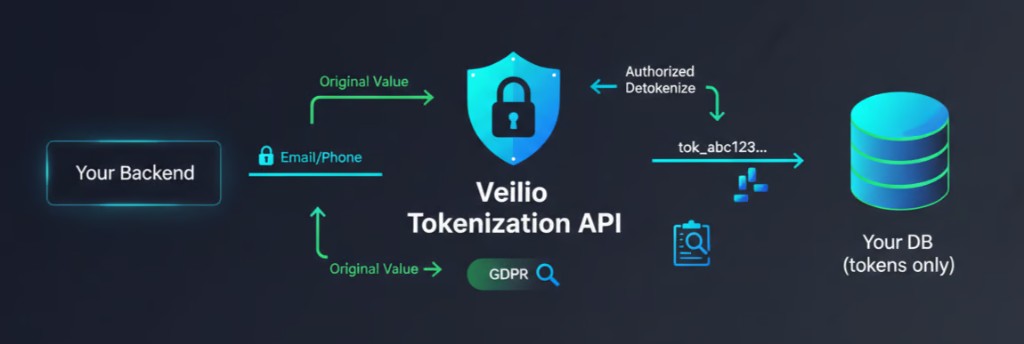
3) Tokenize a sensitive value
bash
curl -s -X POST "$VEILIO_BASE_URL/tokenize" \
  -H "Authorization: Bearer $VEILIO_API_KEY" \
  -H "Content-Type: application/json" \
  -d '{"data":"support@veilio.fr","type":"email"}'
Expected response:
json
{
  "token": "tok_abc123...",
  "createdAt": "2026-03-26T1000.000Z"
}
Store only token in your database — never the raw email.
4) Detokenize when required
bash
curl -s -X POST "$VEILIO_BASE_URL/detokenize" \
  -H "Authorization: Bearer $VEILIO_API_KEY" \
  -H "Content-Type: application/json" \
  -d '{"token":"tok_abc123...","reason":"Send user notification"}'
Expected response:
json
{
  "data": "support@veilio.fr",
  "accessedAt": "2026-03-26T1000.000Z"
}
The reason field is logged for audit and compliance.
5) Recommended application pattern
| Path | Pattern |
|---|---|
| Write (create / update user) | Tokenize before insert or update |
| Read (display profile) | Store and display the token, or a masked placeholder |
| Action (send email, export, support) | Detokenize only at the business step that needs raw data |
| Audit | Always pass a clear reason on detokenization |
Next steps
| Goal | Page |
|---|---|
| SDK integration (recommended) | SDK Javascript · SDK Python |
| Direct HTTP / all endpoints | HTTP Integration · API Reference |
| Production checklist | Security Best Practices · Go-live Checklist |
| Historical import | Historical Migration Mode |
Related links
- Product website: https://veilio.fr
- Contact : https://veilio.fr/contact